

Image Search Techniques: Quick Answer
Image search methods are those that can be used to search for images or information about images through text, visual content, or artificial intelligence. Modern search engines can find objects, landmarks, products, people and even the actual source of an image. Reverse image search and AI visual search are just some of the new tools that make it easier than ever to find accurate visual information.
What Are Image Search Techniques?
Image search techniques are the various methods used to find images and/or information within existing images. Modern image search is not a simple text-based search; rather, it is performed based on the visual information contained in an image, using computer vision and machine learning.
Today, image search is used for many purposes, including:
- Finding the original source of an image
- Identifying plants, animals, landmarks, and products
- Detecting duplicate or stolen images
- Shopping using photos
- Verifying the authenticity of online images
- Discovering visually similar content
With the advancement of AI, the image search function is now faster and more precise, whether on PCs or mobile phones.
How Does Image Search Work?
Most modern image search engines use AI to analyse the content of an image along with computer vision.
The search engine looks at the visual features of the files instead of just the file names or the metadata associated with the image, which include:
- Colors
- Shapes
- Patterns
- Objects
- Faces (where supported)
- Text inside images (OCR)
- Background scenery
These are then compared against billions of indexed images and the closest matches are returned.
Types of Image Search Techniques
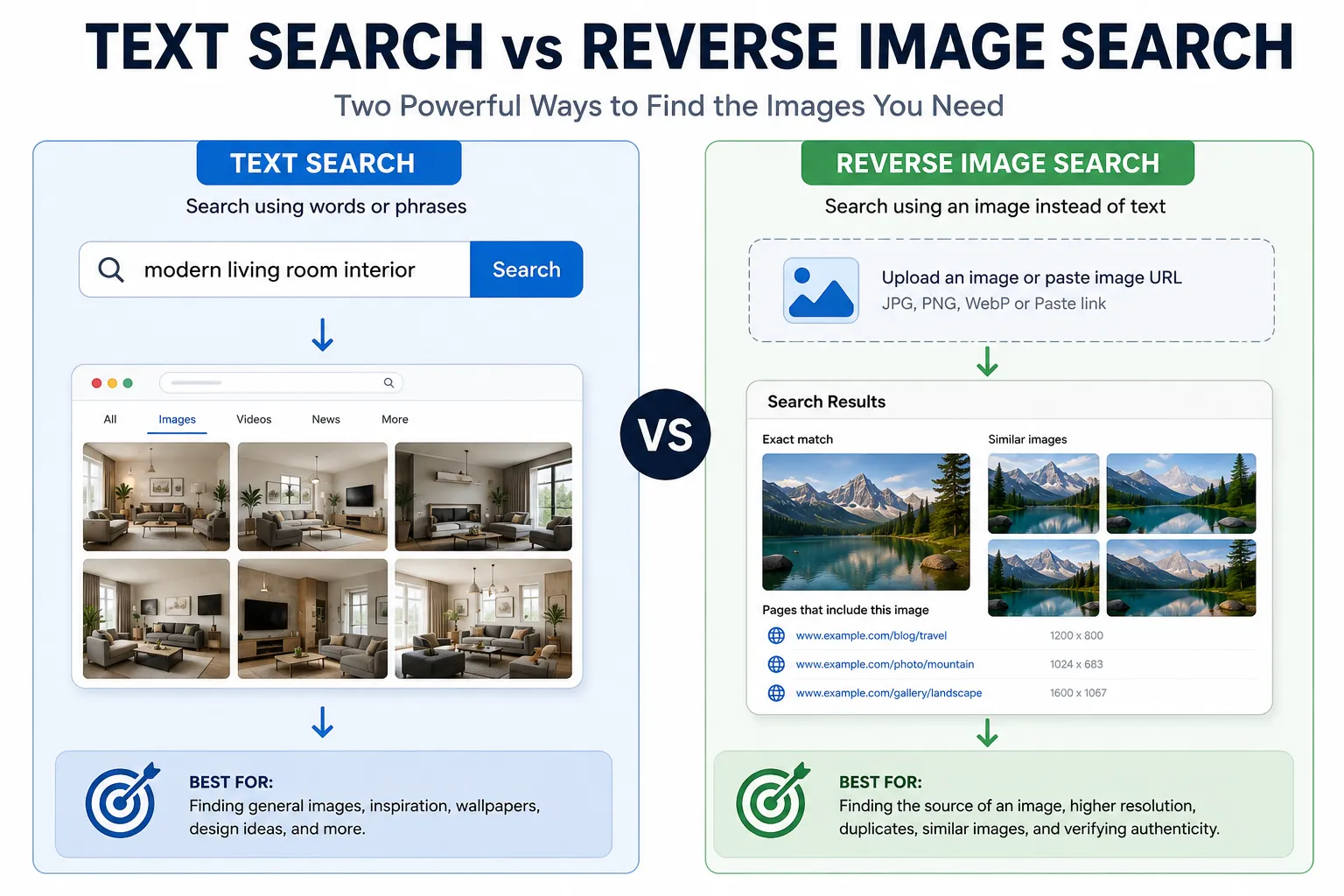
There isn’t just one way to search for images. There are various methods that can be used for various circumstances.
1. Text-Based Image Search
This is the most common approach. People enter one or more words – for example, “sunset beach wallpaper” or “modern office design” – and the search engine shows them pictures that match the words entered.
It’s best for:
- Stock photos
- Wallpapers
- Illustrations
- General image browsing
2. Reverse Image Search
Reverse image search is performed using a photo, rather than keywords.
You upload an image or paste the URL of an image and the search engine looks for:
- The original source
- Higher-resolution versions
- Similar images
- Websites where the image appears
- Visually related content
This method is particularly helpful for copyright research, fact-checking, and for finding unknown objects.
3. AI-Powered Visual Search
The power of AI-driven visual search extends beyond searching for comparable images. It is able to know what an image contains and can identify items, products, places, etc. as well as text.
For instance, an image of a pair of shoes can be taken and an AI search engine can result in finding the shoe’s brand, recommending similar shoes, and providing online stores that sell such shoes.
If you’re interested in artificial intelligence, read our Best Free AI Writing Tools 2026 guide to explore other practical AI applications.
Best Image Search Tools
There are several platforms that have great image search features, some are strong on one and some are strong on another.
Tool | Best For | Key Features |
Google Lens | Everyday visual searches | Object recognition, shopping, translation, landmarks |
Google Images | Reverse image search | Similar images, source discovery |
Bing Visual Search | Product identification | Shopping, object detection, image recognition |
TinEye | Image verification | Finds image origins and duplicates |
Yandex Images | Facial and visual matching | Strong similarity detection for many image types |
Rather than relying on a single platform, professionals often compare results across multiple tools to improve accuracy.
Which Image Search Technique Is the Most Accurate?
As per the requirements, the best method is based on the requirement. None of them is the perfect solution for all situations.
Search Technique | Best Used For | Accuracy |
Text-Based Search | Finding general images | ⭐⭐⭐⭐☆ |
Reverse Image Search | Finding an image’s source or duplicates | ⭐⭐⭐⭐⭐ |
AI Visual Search | Identifying objects and products | ⭐⭐⭐⭐⭐ |
OCR Image Search | Extracting text from images | ⭐⭐⭐⭐☆ |
For example:
- Want to know where a photo originally came from? Use reverse image search.
- Want to identify a plant, product, or landmark? AI visual search is usually the better option.
- Looking for wallpapers or inspiration? A traditional text search often works best.
How to Perform a Reverse Image Search
If you’ve never used reverse image search before, the process is simple.
Step 1: Choose an Image Search Tool
Open a trusted service such as:
- Google Lens
- Google Images
- Bing Visual Search
- TinEye
Each tool offers slightly different results, so trying more than one can be helpful.
Step 2: Upload or Paste the Image
Most platforms allow you to:
- Upload an image from your device.
- Drag and drop a picture into the browser.
- Paste an image URL.
- Take a photo using your smartphone camera.
Step 3: Review the Results
The search engine analyzes the image and may display:
- Websites using the image.
- Higher-quality versions.
- Visually similar images.
- Related products.
- Additional information about objects or locations.
Best Practices for Better Image Search Results
To improve accuracy, follow these recommendations:
- Use high-resolution images whenever possible.
- Crop the image to focus on the main subject.
- Remove unnecessary backgrounds if they distract from the object.
- Compare results across multiple search engines.
- Use recent images when searching for current events or products.
- Combine image searches with text keywords for better context.
Improvements to the image quality, no matter how small, can have a huge impact on search results.
Common Mistakes to Avoid
There are some standard mistakes that are made by many users that do not get them the optimum results.
Avoid these mistakes:
- Uploading blurry or low-quality images.
- Including too many objects in one picture.
- Using heavily edited or filtered photos.
- Relying on only one image search tool.
- Ignoring publication dates when verifying image sources.
- Assuming every search result is accurate without checking the source.
When researching for information, including news, products or copyright images, it is important to verify information from multiple reputable sources.
Frequently Asked Questions
1. What are image search techniques?
Search techniques that are used to find an image or information about an image with keywords, uploaded images, or AI technology for visual recognition are called image search techniques.
2. What is reverse image search?
You can upload an image rather than using keywords with the reverse image search. The search engine finds images that are similar or a match from the web.
3. What is AI image search?
AI image search uses computer vision and machine learning to recognize objects, products, text, landmarks, animals, and other visual elements within an image.
4. Which image search tool is the most accurate?
There isn’t a single winner for every situation. Google Lens, Bing Visual Search, TinEye, and Yandex Images each perform well depending on the type of image you’re searching.
5. Can I search using a photo on my phone?
Yes. Most modern smartphones support visual search through apps like Google Lens or similar built-in image recognition features.
6. Can reverse image search find fake photos?
It can help identify reused or previously published images, making it a useful tool for verifying online content. However, it cannot detect every manipulated image.
7. Is image search free?
Many popular image search tools offer free access to basic features, while some advanced platforms provide premium options for businesses or researchers.
8. Can image search identify products?
Yes. AI-powered visual search can often recognize clothing, electronics, furniture, and other products, then suggest similar items or shopping results.
9. How does OCR improve image search?
Optical Character Recognition (OCR) extracts text from images, making screenshots, signs, documents, and scanned pages searchable.
10. Why do different search engines show different results?
Each search engine uses its own algorithms, databases, and ranking systems, so comparing results from multiple tools often provides the most complete information.
Conclusion
Modern image search techniques have transformed how people discover and verify visual information online. Whether you’re searching with keywords, uploading a photo, or using AI-powered visual recognition, today’s tools can identify objects, locate image sources, and uncover valuable context in seconds.
For the best results, choose the technique that matches your goal, use high-quality images, and compare findings across multiple trusted platforms. As artificial intelligence continues to improve, image search will become even faster, smarter, and more accurate.