
What Is Cursor AI?
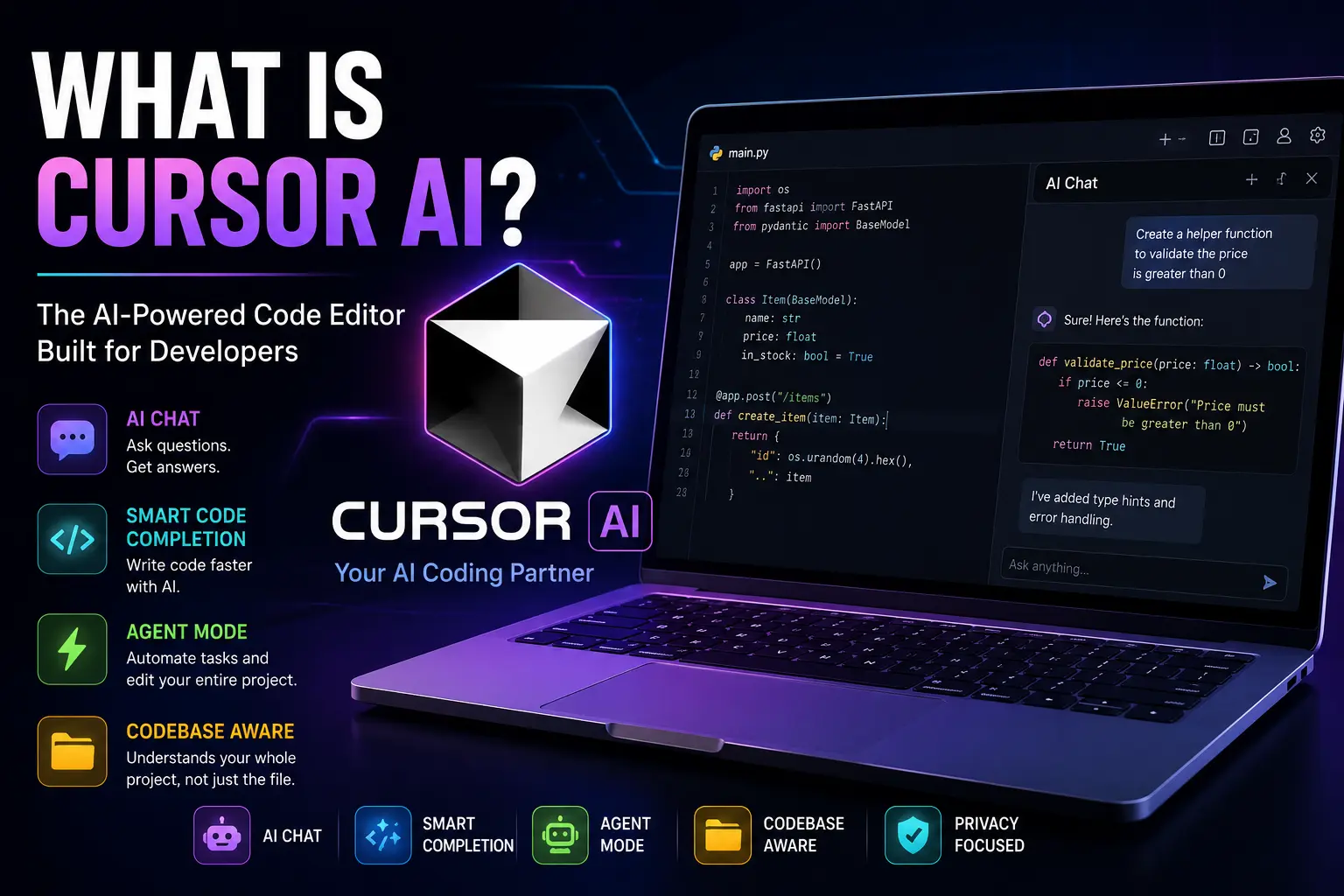
Cursor AI is an AI-powered code editor designed to help developers write, edit, debug, and understand code more efficiently. Built on a familiar Visual Studio Code foundation, it combines intelligent code completion, AI chat, project-wide code understanding, and autonomous coding tools into a single development environment.
If you’re wondering what is Cursor AI, think of it as a coding assistant that understands your entire project—not just the file you’re currently editing. Instead of switching between your IDE and an AI chatbot, Cursor brings AI directly into your coding workflow.
Whether you’re building websites, mobile apps, APIs, or desktop software, Cursor AI can help you write cleaner code, fix bugs faster, and improve productivity.
Who Created Cursor AI?
Cursor AI was developed by Anysphere, a software company focused on building AI-powered developer tools.
The company introduced Cursor to make software development faster and more intuitive by combining modern AI models with a professional code editor.
Unlike browser-based AI chatbots, Cursor is designed specifically for programming. It understands project files, coding patterns, and developer workflows, making it much more useful for software development.
To learn more about the editor and its latest features, you can visit the official Cursor website: https://www.cursor.com.
How Does Cursor AI Work?
Cursor AI combines a traditional code editor with advanced large language models (LLMs). Instead of only answering programming questions, it can interact directly with your codebase and help complete real development tasks.
AI Chat Inside the Editor
Cursor includes an integrated AI chat where you can ask questions in plain English.
For example, you can type:
- Explain this function.
- Fix this error.
- Refactor this code.
- Optimize this algorithm.
- Create a REST API.
- Add authentication.
Instead of copying code into another AI tool, everything happens directly inside the editor.
Codebase Understanding
One of Cursor’s biggest advantages is its ability to understand your entire project.
Traditional AI assistants usually analyze only the code you paste into a chat.
Cursor can search across multiple files, understand relationships between components, and generate suggestions that fit the existing architecture of your application.
This makes it especially useful for medium and large software projects.
Agent Mode
Cursor AI also includes an Agent feature that can perform multi-step development tasks.
Instead of generating a single code snippet, the agent can:
- Read project files
- Create new files
- Update existing code
- Fix bugs
- Refactor multiple components
- Run development tasks
- Suggest improvements
This makes Cursor feel more like an AI development partner than a simple autocomplete tool.
The official Cursor documentation explains these AI capabilities in greater detail: https://docs.cursor.com.
Key Features of Cursor AI
Cursor offers many features designed specifically for software developers.
Smart Code Completion
Cursor predicts what you’re about to write and provides context-aware code suggestions.
Unlike basic autocomplete, it considers your project structure and coding style before making recommendations.
AI-Powered Bug Fixing
When errors appear, Cursor can analyze the code, explain the problem, and suggest possible fixes.
This often saves developers from spending hours searching documentation or Stack Overflow.
Natural Language Editing
Instead of manually changing code, you can describe what you want.
For example:
“Convert this JavaScript function into TypeScript.”
or
“Make this page responsive.”
Cursor generates the necessary code changes automatically.
Multi-File Editing
Many programming tasks require modifying several files.
Cursor understands these relationships and can update multiple files together instead of working on one file at a time.
Terminal Assistance
Cursor can also explain terminal commands, generate shell commands, and help developers understand command-line errors.
This feature is especially helpful for beginners learning Git, Docker, Node.js, Python, or Linux development.
What Can You Build with Cursor AI?
Cursor AI supports many programming languages and frameworks.
Developers commonly use it for:
- Websites
- React applications
- Next.js projects
- Python automation
- Node.js APIs
- Mobile apps
- Machine learning projects
- Backend services
- WordPress plugins
- Shopify applications
Because Cursor understands entire projects, it works well for both small personal apps and enterprise software.
Cursor AI Pricing
Cursor offers both free and paid plans.
The free version includes many core AI features, making it a good option for students, beginners, and developers who want to explore the editor before upgrading.
Paid plans provide additional AI requests, access to premium models, faster responses, and more advanced features designed for professional developers and teams.
Pricing and plan details may change over time, so it’s best to check the official Cursor website for the latest information.
Is Cursor AI Free?
Yes.
Cursor provides a free plan that allows users to experience its AI-powered coding features without paying.
For developers who use AI heavily every day, premium plans unlock higher usage limits and access to additional capabilities.
The free plan is sufficient for many personal projects and learning purposes, while professional developers often choose paid subscriptions for increased productivity.
Cursor AI vs GitHub Copilot
Both Cursor AI and GitHub Copilot help developers write code faster, but they take different approaches.
Feature | Cursor AI | GitHub Copilot |
Primary Purpose | AI-powered code editor | AI coding assistant |
Built On | Visual Studio Code | Extension for supported IDEs |
AI Chat | Yes | Yes |
Project-Wide Code Understanding | Excellent | Good |
Multi-File Editing | Yes | Limited |
Agent Mode | Yes | Available in newer Copilot features |
Code Completion | Excellent | Excellent |
Best For | Full AI-assisted development | Fast code suggestions |
If you spend hours coding every day, Cursor often feels more like an AI teammate because it understands your project and can perform multi-step tasks instead of simply suggesting the next line of code.
Cursor AI vs Visual Studio Code
Since Cursor is built on Visual Studio Code, the interface feels familiar to anyone who has used VS Code before.
The biggest difference is that Cursor includes AI features directly inside the editor.
With standard VS Code, you usually install extensions for AI coding assistance. Cursor integrates those capabilities into the development experience, reducing the need to switch between tools.
Developers can also continue using many of the VS Code extensions and shortcuts they already know, making the transition relatively easy.
Pros and Cons of Cursor AI
Like any development tool, Cursor has strengths and limitations.
Pros
- Easy to learn for VS Code users
- Understands your entire codebase
- Built-in AI chat
- Powerful code generation and editing
- Supports many programming languages
- Speeds up debugging and refactoring
- Free plan available
- Helpful for both beginners and experienced developers
Cons
- Requires an internet connection for most AI features
- AI-generated code should always be reviewed before deployment
- Premium features require a paid subscription
- Large projects may occasionally require additional context for the best results
Who Should Use Cursor AI?
Cursor AI is suitable for a wide range of users.
Students
Students can use Cursor to understand programming concepts, practice coding, and receive explanations for unfamiliar code.
Professional Developers
Software engineers can automate repetitive tasks, debug applications more efficiently, and accelerate feature development.
Freelancers
Freelance developers often work on multiple projects at once. Cursor helps reduce development time while maintaining code quality.
Startup Teams
Small teams can use Cursor to increase productivity, generate boilerplate code, review changes, and move faster without sacrificing collaboration.
Is Cursor AI Worth Using?
For many developers, yes.
If you frequently switch between your IDE, documentation, and AI chat tools, Cursor brings those workflows together in one place. Its ability to understand an entire project, edit multiple files, and assist with debugging makes it more than a simple autocomplete tool.
That said, AI should support your development process—not replace careful testing, code reviews, or software engineering best practices.
Frequently Asked Questions
1. What is Cursor AI used for?
Cursor AI is used to write code, fix bugs, explain existing code, generate new features, refactor projects, and improve developer productivity using artificial intelligence.
2. Is Cursor AI free?
Yes. Cursor offers a free plan with core AI features. Paid plans provide higher usage limits, premium AI models, and additional capabilities for professional developers.
3. Is Cursor AI better than GitHub Copilot?
It depends on your workflow. Cursor is ideal if you want an AI-powered editor with project-wide understanding and advanced editing features. GitHub Copilot is excellent for inline code completion and integrates with multiple IDEs.
4. Does Cursor AI use GPT or Claude?
Cursor supports multiple leading AI models. The available models may change over time as new versions are added, allowing developers to choose the one that best fits their needs.
5. Can Cursor AI build a complete application?
Cursor can help generate code, create project structures, implement features, and fix bugs. However, developers are still responsible for reviewing, testing, and maintaining the final application.
6. Which programming languages does Cursor support?
Cursor works with many popular languages, including JavaScript, TypeScript, Python, Java, C++, Go, PHP, Rust, and more.
7. Is Cursor AI good for beginners?
Yes. Beginners can use Cursor to learn programming, understand unfamiliar code, receive explanations, and practice building real-world projects while improving their coding skills.
8. Does Cursor AI replace programmers?
No. Cursor is designed to assist developers, not replace them. Human judgment, software architecture, testing, and problem-solving remain essential parts of software development.
9. Can Cursor AI work with existing projects?
Yes. One of Cursor’s biggest strengths is understanding existing codebases, making it useful for maintaining, improving, and expanding ongoing projects.
10. Is Cursor AI safe to use?
Cursor is widely used by developers, but you should always review AI-generated code before deploying it to production. Following secure coding practices and protecting sensitive information remains your responsibility.
Conclusion
Cursor AI is one of the most advanced AI-powered code editors available today. Built on the familiar Visual Studio Code experience, it combines intelligent code completion, AI chat, project-wide understanding, and powerful editing tools into a single platform.
Whether you’re learning to code, building client websites, developing APIs, or working on large software projects, Cursor can help you write better code in less time. Its blend of automation and developer-friendly features makes it an excellent choice for programmers looking to improve their workflow without changing the way they work.
As AI continues to shape software development, tools like Cursor AI are becoming valuable companions for developers of all skill levels.